3D Floor Plan
Upload a floor plan. Get a 3D view. In under a minute.
Drop any 2D floor plan and get back a clean axonometric 3D projection. Then render it with realistic materials and colors for client presentations. No modeling software required.
The problem
Your clients cannot read 2D floor plans. You know this.
You email a floor plan PDF. The client stares at it. They call and ask "where is the kitchen?" You walk them through it line by line.
You spend an hour building a SketchUp model just so the client can see what the plan looks like in 3D. The plan changes. You rebuild.
Design-build competitors are showing 3D renders. You are showing line drawings and hoping the client has spatial imagination.
By the time you invest in a proper 3D model, the design has already changed three times.
The solution
Turn any floor plan into a 3D presentation image in seconds.
Upload any 2D floor plan - PNG, JPG, or PDF from any source
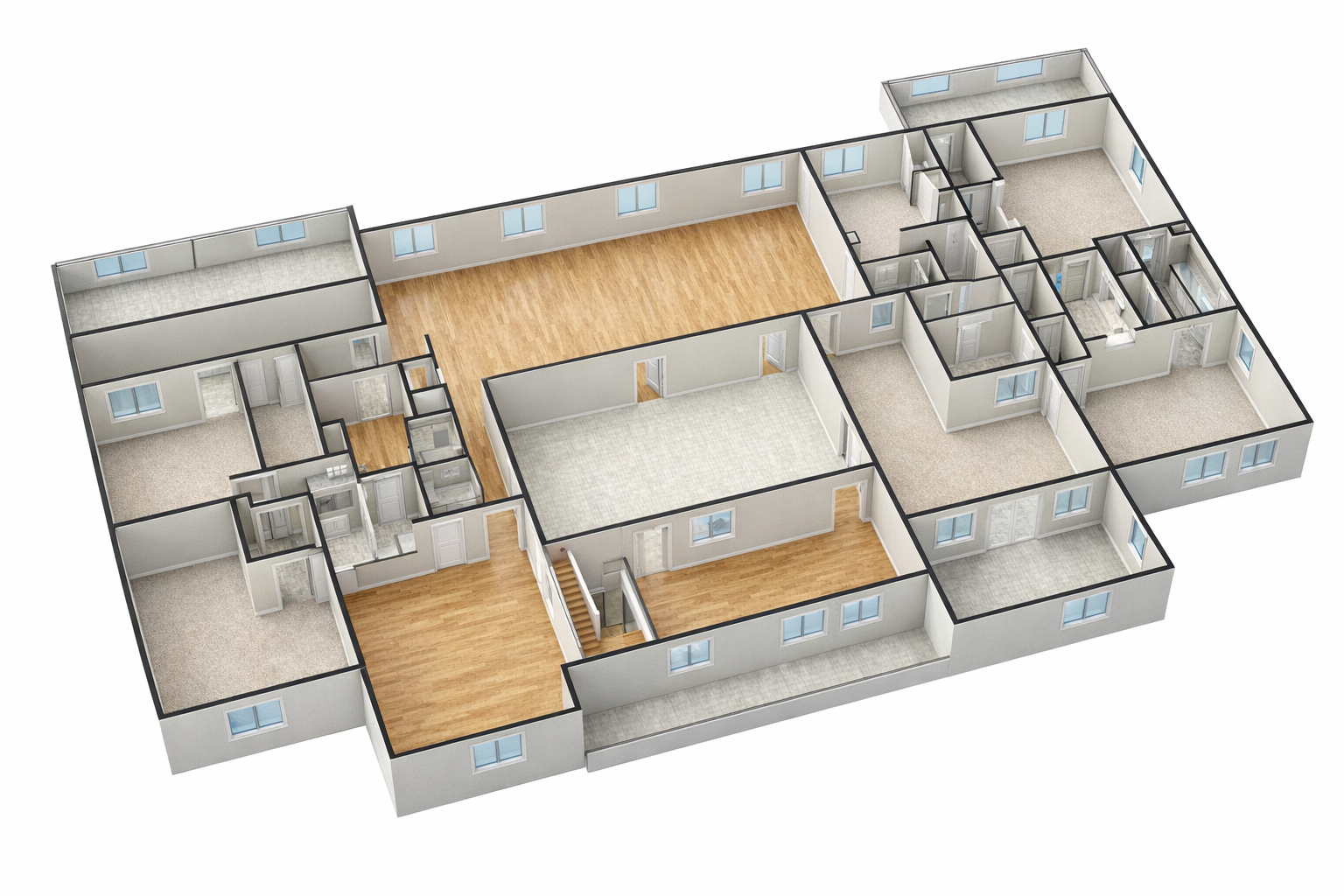
AI creates a clean black-and-white axonometric (3D) projection preserving your exact layout, dimensions, and labels
One click to add realistic materials: hardwood floors, tiled bathrooms, painted walls, glass windows
Download both versions for presentations, proposals, or client emails
Works with hand sketches, CAD exports, or any floor plan image
What it actually does
Everything that makes this tool worth it.
Preserves Your Exact Layout
The AI does not redesign your plan. Every room, every wall, every dimension stays exactly where you placed it. The 3D view is a faithful projection of your 2D design.
Highest Quality AI Rendering
Powered by the latest OpenAI image model at maximum quality settings. Professional architectural illustration style with clean lines, accurate proportions, and consistent rendering.
Two-Step Workflow
Step one: clean black-and-white axonometric line drawing. Step two: add realistic colors and materials. Use one or both depending on your presentation needs.
Works With Any Floor Plan
Hand-sketched on paper and photographed. Exported from AutoCAD, Revit, or SketchUp. Downloaded from a permit application. If it looks like a floor plan, it works.
Instant Download
Every generated image is downloadable as a high-resolution PNG. Drop it into a proposal, a client email, a presentation deck, or a social media post.
Saved to Your Project
Link any generation to a project in your account. Your entire team can see the 3D visualizations alongside other project deliverables.
How it works
Upload a plan. Download a 3D view. Three steps.
Upload your floor plan
Drop a PNG, JPG, WebP, or PDF of any 2D floor plan. Hand-drawn, CAD-exported, or from any design tool.
Get a 3D axonometric view
AI analyzes your plan and creates a clean architectural axonometric projection with extruded walls, room volumes, and preserved labels.
Render in color with one click
Optionally add realistic materials - hardwood floors, tiled baths, painted walls. Ready for client presentations or proposals.
Output
What you get
Tool consolidation
From flat plan to 3D presentation. Instantly.
Everything you were paying for separately, built into a single workflow your whole team will actually use.
Who it's for
Built for every firm that presents to clients.
Architects
You have the plan. Now show it to the client in a way they actually understand. Upload any floor plan from any stage of design and get a 3D axonometric view ready for a presentation deck.
Design-Build Firms
The client just approved a layout. You upload the plan, show them a 3D view with colored materials, and they sign. No waiting for renders. No paying a modeler.
Real Estate Developers
Marketing floor plans that sit flat on a page become 3D renders that sell units. Upload the plan, download the 3D view, drop it in the brochure.
Get started
Your clients deserve to see it in 3D. Give them that.
Upload any floor plan. Get a professional axonometric 3D view with optional color rendering. No modeling software. No waiting.